



QGH VERDICT · 2026 LAPTOP
A simple Mac. A specific audience.
Shortlist MacBook Neo for a defined browser-and-document routine. Check course software, memory requirements and your monitor setup before buying. Our verdict is based on documentation; QGH has not tested a review unit.
Good fit to explore
Everyday documents and research, with compatible apps and realistic storage needs.
Compare first
Specialist software, demanding sustained work or a desk needing more than one external screen.
Current U.S. starting prices checked October 11, 2026: $699 regular; $599 for eligible education buyers. See the Apple Store and Education Store. The $599 general launch price discussed below is a historical reference.

QGH review methodology: This is a research-based editorial review of a gadget launched in 2026. QGH has not tested a review unit. Specifications and manufacturer claims were checked on October 11, 2026; performance, comfort and battery life have not been independently measured. Our score assesses the documented feature mix and buyer fit, not measured performance.
This is a new Mac introduced in 2026
Apple announced MacBook Neo on March 4, 2026, with availability from March 11 and a U.S. starting price of $599. Our official-source check is dated October 11. The general launch price is the reference here; education eligibility and retailer discounts are separate checks.
Read the specification before imagining the workload
Apple lists A18 Pro, 8GB unified memory and 256GB or 512GB storage. The 13-inch Liquid Retina display is specified at 2408 × 1506 and 500 nits. Its published battery tests quote up to 16 hours of video streaming or 11 hours of wireless web. These are manufacturer results, not our endurance measurements.
Our inference is that the base configuration is a plausible fit for modest everyday work, provided the applications you need run on macOS. Write down your real tasks: course software, office documents, browser tabs and any specialist tools. Do not buy on an assumption that a low entry price makes every workload affordable. We have not benchmarked exports, memory pressure, gaming or long-session responsiveness.
The two USB-C ports are not equivalent
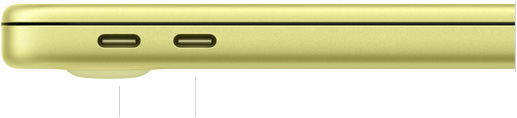
The specification lists one USB 3 port up to 10Gb/s with DisplayPort, and one USB 2 port up to 480Mb/s. Both support charging. External display support is one screen up to 4K at 60Hz. The connector shape alone therefore does not describe the capability.
Plan which port will carry the monitor, storage and charging before choosing a hub. Reserve the display-capable connection for your screen, and check the hub’s display, data and power specifications separately. Count any adapters or storage devices in the complete purchase cost. A familiar connector does not guarantee the same capabilities on every port.
Is MacBook Neo worth it for students and everyday work?
Our buying verdict: Shortlist Neo for a defined browser-and-document routine when your required applications run on macOS and your storage needs are realistic. Compare another configuration or computer first if your essential work needs more memory, demanding sustained processing or a different monitor setup. This is our interpretation of the documented specification, not a performance test.
For students, the deciding question is the course requirement. Make a list of the exact applications, plug-ins, assessment tools and peripherals you will use. Ask the department for supported operating systems and configurations. A laptop that suits reading, assignments and video calls can still be the wrong purchase for a specialist module. Check the requirements before relying on a student discount.
| Your main need | What to check before buying |
|---|---|
| Documents, research and everyday browsing | Required apps, concurrent tasks and local files |
| A specialist course or professional workflow | Exact software requirements and relevant independent testing |
| A desk with several accessories | Monitor support, hub specifications and full setup cost |
| Large local libraries or project files | Storage capacity, backup plan and external-device requirements |
MacBook Neo 256GB vs 512GB: storage and Touch ID
The official specification lists both storage options with the same memory capacity. More SSD space does not mean more RAM. Start with the files and applications you need to keep locally, then allow room for new coursework, projects and system updates. An external drive can help with files, but it also adds cost and another device to carry.
Touch ID is a separate buying detail: Apple’s specification shows keyboard options with and without it. Verify the exact configuration in the official purchase selector rather than assuming every Neo has biometric sign-in. Choose the configuration that meets your file and authentication needs; do not select a larger SSD expecting it to remove a memory constraint.
MacBook Neo vs MacBook Air: when should you compare?
Compare the exact Air model and configuration when Neo’s limitations affect an essential task. Look at memory, storage, monitor support and the total price including accessories. Paying more makes sense only when the extra capability answers a real requirement. If your brief is modest and the required software is supported, a longer feature list alone is not a reason to spend more.
MacBook Neo buying questions
Is 8GB of memory enough?
There is no universal answer for every user. Check your applications and the tasks you run together. We have not measured memory pressure on Neo, so we cannot promise smooth operation for a particular workload or number of browser tabs.
Is the MacBook Neo student discount automatic?
No discount should be assumed from the word “student” alone. Apple’s launch announcement quoted a separate U.S. education starting price. Check current eligibility, the exact configuration and the final checkout price. The launch figures are historical references, not a verified live offer.
Why is MacBook Neo cheaper?
The product’s entry positioning comes with documented configuration and connectivity limits. That helps explain the buying trade-off, but we cannot establish Apple’s production costs or pricing strategy. Judge whether the limitations matter to your use rather than equating a lower price with either poor quality or guaranteed value.
QGH editorial score: 4.1/5
Documented features 4.0/5 for the everyday laptop brief; compatibility 3.8/5 for software and peripheral constraints; ownership fit 4.2/5 for portability with fixed configuration limits; value 4.4/5 at the entry price. Equal-weight average: 4.1/5.
The four criteria carry equal weight. A higher number indicates a stronger documented buying proposition for the stated audience. It is not a laboratory result, a customer-review average or an independent validation of manufacturer claims.
Are both MacBook Neo USB-C ports equally fast?
No. Apple lists one USB 3 port up to 10Gb/s and one USB 2 port up to 480Mb/s.
Official sources and price reference
Apple 2026 launch evidence · Official product page · Additional official reference. Sources checked October 11, 2026. Price reference: $599 (U.S. launch starting price, 256GB). U.S. references do not establish local prices or availability; confirm the configuration and checkout total before ordering.
Visual credits: the featured QGH image is an AI-generated editorial illustration. The product and port photographs in this article are official Apple images. QGH has not photographed a test unit. The official merchant link in this review is not an affiliate link.